Vos can sort one or more field in input file in one pass.
By declaring only specific fields or using a different separator in vos script, Vos can re-create a new file with a new format and data.
Vos can omit and include specific data in specific field/record.
Vos can join two file into one file with all or specific fields included in output file.
Vos was developed on GNU/Linux system, so any prerequisite below only valid on system that running GNU/Linux system. Usually, any Unix like system could compile the source, it just does not fully tested yet.
This software/tools below is used in developing Vos, therefore we recommended you to use the same or greater version when building Vos from the source.
This step assume that you already get the source and saved into your machine.
	$ tar jxvf vos-xxxx.xx.xx.tar.bz2
	$ cd vos/src
	$ make
Where xxxx.xx.xx is Vos version (depend on which version that has been downloaded). When running "make", make program will create directory "build" in "vos" directory, vos executable is placed in there (vos/build).
For later use, you should copy Vos executable to your PATH directory. In example:
	$ pwd
	/home/johndoe/tmp/vos/src
	$ echo $PATH
	/home/johndoe/bin:/usr/local/bin:/usr/bin:/bin
	$ cp ../build/vos /home/johndoe/bin
Vos program only have one parameter: vos script.
vos < vos-script >
vos-script is a file contains vos statements that will be executed and processed.
Before running Vos program, there are severals environment variables that you can set to change behaviour of program while running. Some of the environment variable also can be set at the vos script using Vos variables.
Default value : 0
This variable is an optional and used only for debugging, normal use/user
should not use this parameter. The VOS_DEBUG
environment variables can have a value,
Those value can be combined to get more debug output.
Example on setting VOS_DEBUG variable on Bash shell,
$ export VOS_DEBUG=3
this value will tell Vos program to debug parsing process (2) but will not process the script (1).
Default value : 8192
This variable is used to set size of buffer for read/write on file, in bytes.
This example set buffer size to ~ 1 MB,
$ export VOS_FILE_BUFFER_SIZE=1000000;
Default value : 0
This variable affect order on sort output.
If VOS_COMPARE_CASE is set to 0, "B"
will come first then "a", but
if VOS_COMPARE_CASE is set to 1, "a"
will come first then "B".
Example on how to set it on Bash shell,
	$ export VOS_COMPARE_CASE=0; # or
	$ export VOS_COMPARE_CASE=1;
Default value : 2
This variable affect on how many thread will be used for sort process. The
recommended value is equal to a number of processor that you have on your
machine.
Example on how to set it on Bash shell,
$ export VOS_PROCESS_MAX=8;
Default value : 100,000
This variable affect on how many "row" that program must keep in memory before
writen to temporary file.
Example on how to use it:
$ export VOS_PROCESS_MAX_ROW=400000;
Default value : /tmp/
While in sort process, program sometime use temporary file. This temporary
file usually, as default, placed in "/tmp/" directory. You can add two or more
directories as temporary directory, as long as there is free space and user
who run the Vos program has a write access to it.
We recommended that you to use a temporary directory that has a place in a
different disk than input file, for technical reason it's decrease processing
time.
$ export VOS_TMP_DIR="/var/tmp/";
which result that program will use "/tmp/" (default from program), "/var/tmp/",
and "/media/tmp/" as temporary directories.
Another example :
$ export VOS_TMP_DIR "/media/tmp/":"/disk01/";
which result that program will use "/media/tmp/" and "/disk01/" as temporary directories.
To illustrate on how Vos script work, we will use two input files as an example here, "artist.data" and "album.data".
artist.data1,"Broken Social Scene" 2,"U2" 3,"Led Zeppelin" 4,"John Legend" 5,"Deep Purple"album.data
'You Forgot it in People'   1
'Burn'                      5
'Get Lifted'                4
'The Joshua Tree'           2
'Broken Social Scene'       1
Vos variable is used with "SET" statement.
Vos variable is used to adapt with the environment where Vos will be running. For example, let say that you have a machine with 8 processor and 16 GB of memory and you want to sort 20,000,000 rows of data with it's size maybe about 2 GB. Instead of using default maximum row (which is 100,000) with two thread you can set maximum row to 2,500,000 and maximum thread to 8, which will decrease processing time.
There are two method to set Vos variable, first, by explicitly defined it on vos script by using SET statement; second, by defined in environment variable using shell set or export.
Default value : 8192
This variable is used to set size of buffer for read/write on file, in bytes.
This example set buffer size to ~ 1 MB,
set FILE_BUFFER_SIZE 1000000;
This variable affect order on sort output.
If PROCESS_COMPARE_CASE_SENSITIVE is used, "B"
will come first then "a", but
if PROCESS_COMPARE_CASE_NOTSENSITIVE is used "a"
will come first then "B".
Example on how to use it:
	set PROCESS_COMPARE_CASE_SENSITIVE;
	set PROCESS_COMPARE_CASE_NOTSENSITIVE;
Default value : 2
This variable affect on how many thread will be used for sort process. The
recommended value is equal to a number of processor that you have on your
machine.
Example on how to use it:
set PROCESS_MAX 8;
Default value : 100,000
This variable affect on how many "row" that program must keep in memory before
writen to temporary file.
Example on how to use it:
set PROCESS_MAX_ROW 400000;
Default value : /tmp/
While in sort process, program sometime use temporary file. This temporary
file usually, as default, placed in "/tmp/" directory. You can add two or more
directories as temporary directory, as long as there is free space and user
who run the Vos program has a write access to it.
We recommended you to use a temporary directory that has a place in a
different disk than input file, for technical reason it's decrease processing
time.
When ':' is set as the first character in a string
value then the rest of value is added to the list of temporary directory,
which means the last or the default temporary directory will not be replaced.
This setting allow you to add several directories in two or more SET
statement.
In example :
	SET PROCESS_TEMPORARY_DIRECTORY		:"/var/tmp/";
	SET PROCESS_TEMPORARY_DIRECTORY		:"/media/tmp/";
which result that program will use "/tmp/" (default from program), "/var/tmp/",
and "/media/tmp/" as temporary directories.
Another example :
	SET PROCESS_TEMPORARY_DIRECTORY		:"/var/tmp/";
	SET PROCES_TEMPORARY_DIRECTORY		"/media/tmp/":"/disk01/";
which result that program will use "/media/tmp/" and "/disk01/" as temporary directories but not include "/var/tmp" because it's has been override by the last SET statement.
Vos script is not case sensitive, "Load" is equal with "LOAD".

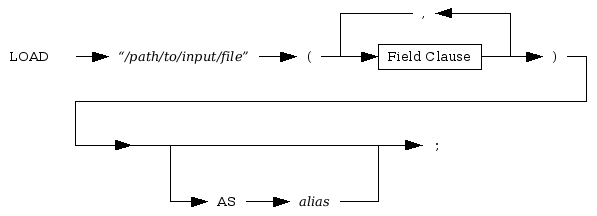
Example on using Load Statement:
LOAD "artist.data" (
	   :idx :   ::',',
	'"':name:'"'::
) as artist;

LOAD "album.data" (
	'\'':title     :'\''::,
	    :artist_idx:    :28:28
) as album;
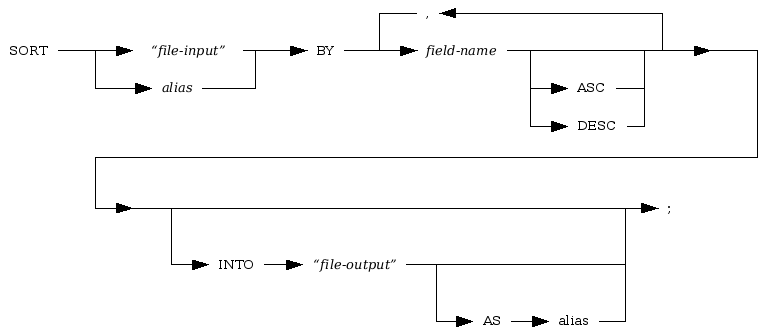
Example on using Sort Statement:
This script will sort artist.data by
name (second field) on descending order,
LOAD "artist.data" (
	   :idx :   ::',',
	'"':name:'"'::
) as artist;

SORT artist BY name DESC;
If you run the script the output would be like this,
2|U2
3|Led Zeppelin
4|John Legend
5|Deep Purple
1|Broken Social Scene
This script will sort album.data by artist_idx (second field) then by title (first field) and save the output to a file album_sorted.data .
LOAD "album.data" (
	'\'':title     :'\''::,
	    :artist_idx:    :28:28
) as album;

SORT album BY artist_idx, title INTO "album_sorted.data";
If you run the script the output would be like this,
Broken Social Scene|1
You Forgot it in People|1
The Joshua Tree|2
Get Lifted|4
Burn|5
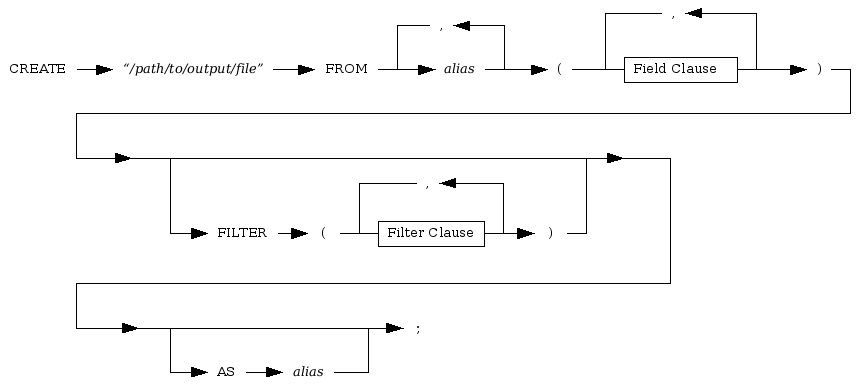
Create statement is used to create a new data with new format or with
different field output order.
Create statement also can be used to combine several input file into one file.
Example on using Create Statement,
This script will combine artist.data and
album.data into one file, fields will be
separated by '|'.
LOAD "artist.data" (
	   :idx :   ::',',
	'"':name:'"'::
) as artist;

LOAD "album.data" (
	'\'':title:'\''::,
	    :artist_idx::28:28
) as album;

CREATE "artist_album.data" from artist, album (
	   :artist.idx      :   ::'|',
	'"':artist.name     :'"'::'|',
	   :album.artist_idx:   ::'|',
	'[':album.title     :']'::
);
If you run the script the output would be like this,
1|"Broken Social Scene"|1|[You Forgot it in People]
2|"U2"|5|[Burn]
3|"Led Zeppelin"|4|[Get Lifted]
4|"John Legend"|2|[The Joshua Tree]
5|"Deep Purple"|1|[Broken Social Scene]
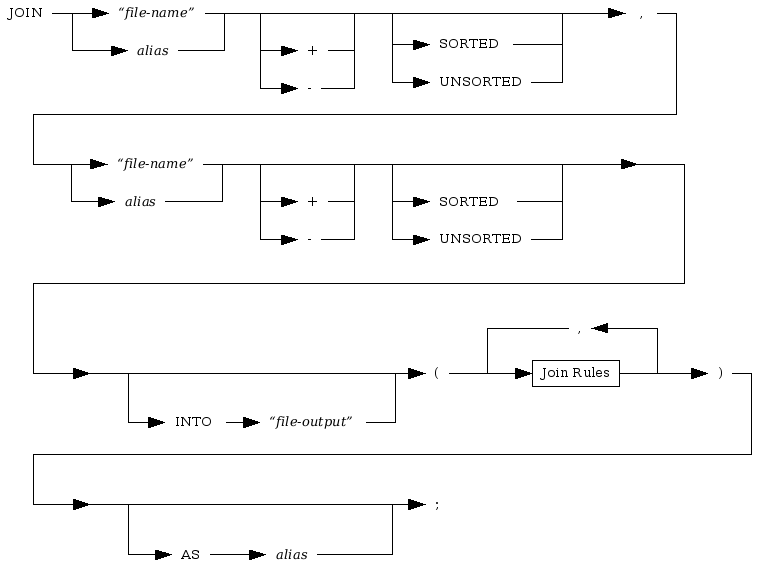

Join statement is used to combine two input file into one file, like create statement, but using specific fields as a matching rule.
Example on using Join statement,
LOAD "artist.data" (
           :idx :   ::',',
        '"':name:'"'::
) as artist;

LOAD "album.data" (
        '\'':title     :'\''::,
            :artist_idx:    :28 :28
) as album;

JOIN artist, album INTO "join_artist_album.data" (
        artist.idx = album.artist_idx
);
If you run the script the output would be like this,
1|Broken Social Scene|You Forgot it in People|1
2|U2|The Joshua Tree|2
4|John Legend|Get Lifted|4
5|Deep Purple|Burn|5
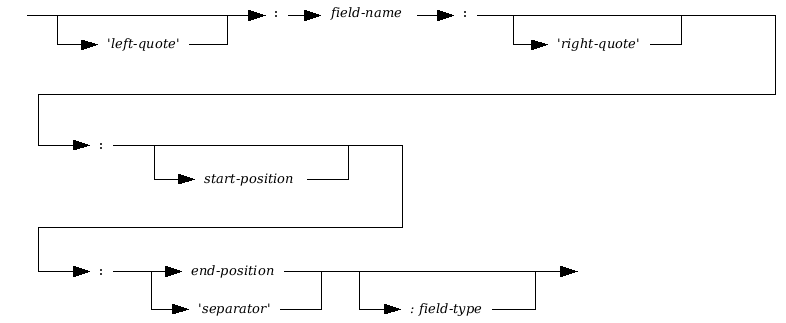
First, when reading field data start-position is have a higher priority than left-quote. In example, suppose that input data is like this,
'You Forgot it in People'
and you defined field like this,
'\'':field00:'\'':4:22:
Vos will always read from position 4, not from first character of left-quote, which result " Forgot it in Peopl".
Second, while reading field data end-position have a higher priority than right-quote, and riqht-quote is have a high priority than separator.
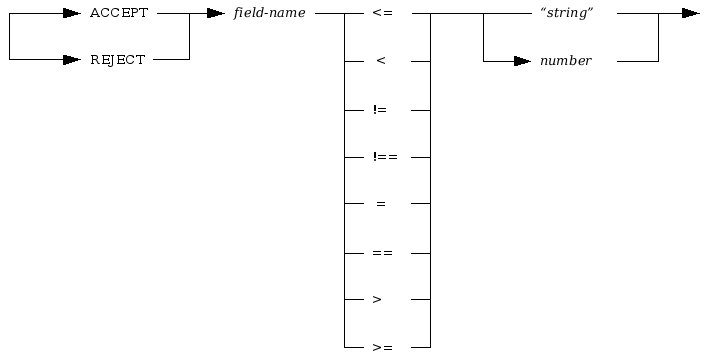
Example of using filter:
This script will only write artist and album where it's field
idx value is 1.
LOAD "artist.data" (
	   :idx :::',',
	'"':name:'"'::
) as artist;

LOAD "album.data" (
	'\'':title     :'\''::,
	    :artist_idx:    :28:28
) as album;

CREATE "filter_artist_album.data" from artist, album (
	   :artist.idx	:::'|',
	'"':artist.name	:'"'::'|',
	'[':album.title	:']'::
) FILTER (
        ACCEPT artist.idx = 1,
        REJECT album.artist_idx != 1
);
If you run the script the output would be like this,
1|"Broken Social Scene"|[You Forgot it in People]
|""|[Broken Social Scene]
Copyright (C) 2009 M. Shulhan (ms@kilabit.info) All rights reserved.

Redistribution and use in source and binary forms, with or without
modification, are permitted provided that the following conditions are met:

1. Redistributions of source code must retain the above copyright notice, this
   list of conditions and the following disclaimer.

2. Redistributions in binary form must reproduce the above copyright notice,
   this list of conditions and the following disclaimer in the documentation
   and/or other materials provided with the distribution.

3. All advertising materials mentioning features or use of this software must
   display the following acknowledgment:
   "This product includes software written by M. Shulhan (ms@kilabit.info)"

4. The names "M. Shulhan" or "Vos" must not be used to endorse or promote
   products derived from this software without specific prior written
   permission.

5. Products derived from this software may not be called "Vos" nor may "Vos"
   appear in their names without prior written permission of the author.

THIS SOFTWARE IS PROVIDED BY SHULHAN "AS IS" AND ANY EXPRESS OR IMPLIED
WARRANTIES, INCLUDING, BUT NOT LIMITED TO, THE IMPLIED WARRANTIES OF
MERCHANTABILITY AND FITNESS FOR A PARTICULAR PURPOSE ARE DISCLAIMED. IN NO
EVENT SHALL THE COPYRIGHT OWNER OR CONTRIBUTORS BE LIABLE FOR ANY DIRECT,
INDIRECT, INCIDENTAL, SPECIAL, EXEMPLARY, OR CONSEQUENTIAL DAMAGES (INCLUDING,
BUT NOT LIMITED TO, PROCUREMENT OF SUBSTITUTE GOODS OR SERVICES; LOSS OF USE,
DATA, OR PROFITS; OR BUSINESS INTERRUPTION) HOWEVER CAUSED AND ON ANY THEORY
OF LIABILITY, WHETHER IN CONTRACT, STRICT LIABILITY, OR TORT (INCLUDING
NEGLIGENCE OR OTHERWISE) ARISING IN ANY WAY OUT OF THE USE OF THIS SOFTWARE,
EVEN IF ADVISED OF THE POSSIBILITY OF SUCH DAMAGE.